Best AI Scheduling Assistants for Consultants: 2026 Guide
Finding the best AI scheduling assistants for consultants is not about automating a few calendar invites. It is about defending your billable delivery hours once client calls start hitting your week.
In the first two guides of this series, we covered how to pick the right scheduling software for external booking links and how to structure your consultant meeting stack for video rooms and AI notetakers. Yet even with a clean booking link and sharp transcription, most consultants still end Friday exhausted with half their client deliverables unfinished.
Why? Because external booking tools only coordinate when you meet. They do nothing to protect when you work.
Workload Fact: Knowledge workers spend 11.3 to 18.0 hours per week in scheduled calls (28 to 45 percent of a 40-hour week), and 78 percent report that meeting overload prevents them from completing core work (Atlassian / Flowtrace Research).
AI scheduling assistants solve this internal half of the calendar equation. Instead of treating your calendar as a passive grid waiting to be hijacked by reactive calls, they actively block deep work, insert recovery buffers, and reschedule lower-priority tasks automatically when client timelines shift.
Here is a practical breakdown of the top AI scheduling assistants in 2026, how their two core philosophies differ, and where internal calendar defense still falls short without an upfront intake gate.
AI Autopilot vs. Calendar Defense: What Is the Difference?
Before picking a tool, understand the fundamental split in how AI calendar apps operate in 2026 (Volticen / Get Alfred):
- AI Autopilot (Task-First): You feed the system your tasks, deadlines, and priorities. The AI builds and rebuilds your entire daily schedule automatically around fixed meetings. Motion leads this category.
- Calendar Defense (Rule-Based): You keep manual control of your day, while the AI overlays flexible Focus Time blocks, recurring habits, and mandatory meeting buffers that adapt as new bookings arrive. Reclaim.ai and Clockwise lead this category.
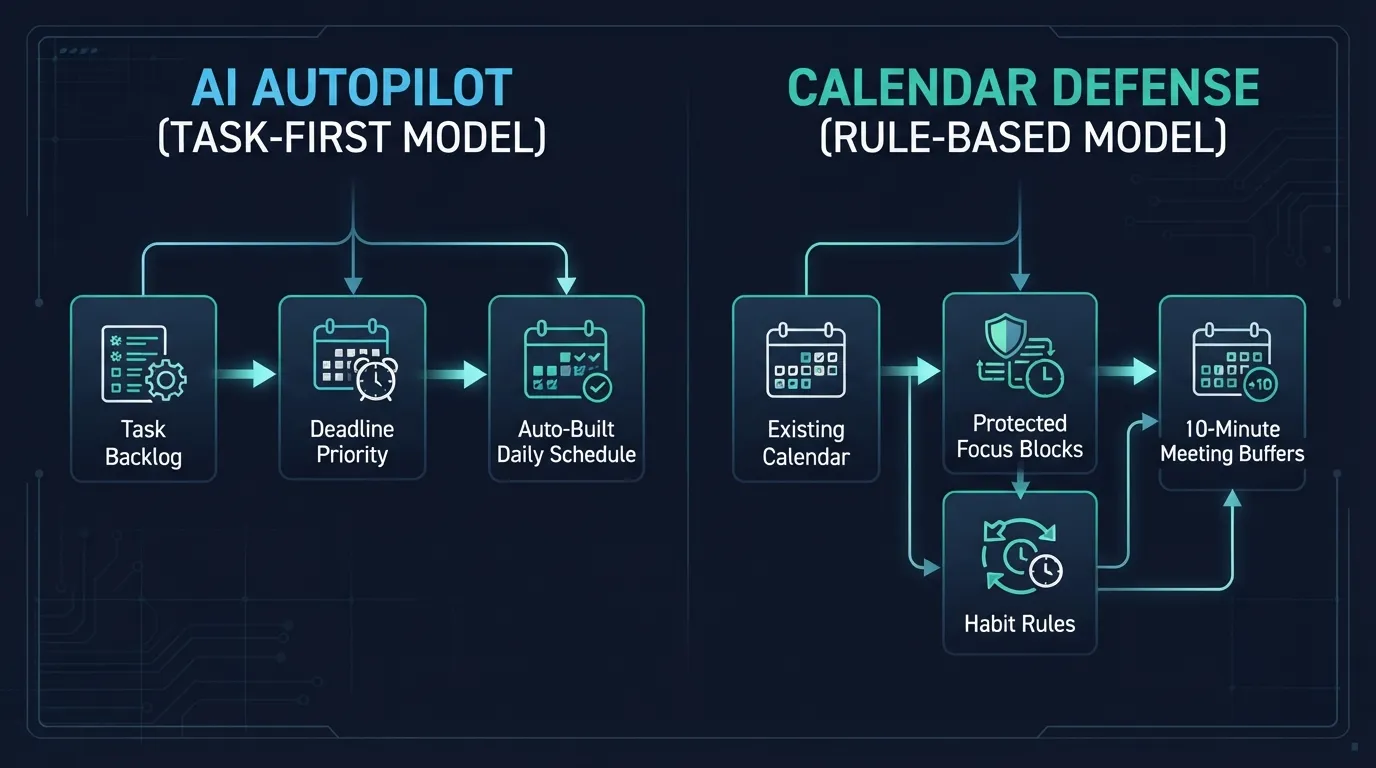
Interruption Fact: Office workers experience a disruption every two minutes, averaging 275 interruptions per day, and frequent context-switching reduces cognitive productivity by up to 40 percent (Microsoft WTI / APA).
Deep-Dive: The Best AI Scheduling Assistants for Consultants
1. Reclaim.ai: Best Overall for Solo Consultants and Calendar Defense
Reclaim.ai sits directly on top of your existing Google Calendar or Outlook setup and acts as an intelligent bodyguard for your focus hours. Rather than forcing you to abandon your current task app, it turns habits, deep work, and recovery breaks into smart calendar events that shift dynamically when client calls land.
Core Strengths:
- Smart Focus Time Defense: Automatically reserves target hours for billable client delivery each week and marks them "Free" until your calendar fills up, flipping them to "Busy" only when needed so you stay bookable without losing deep work.
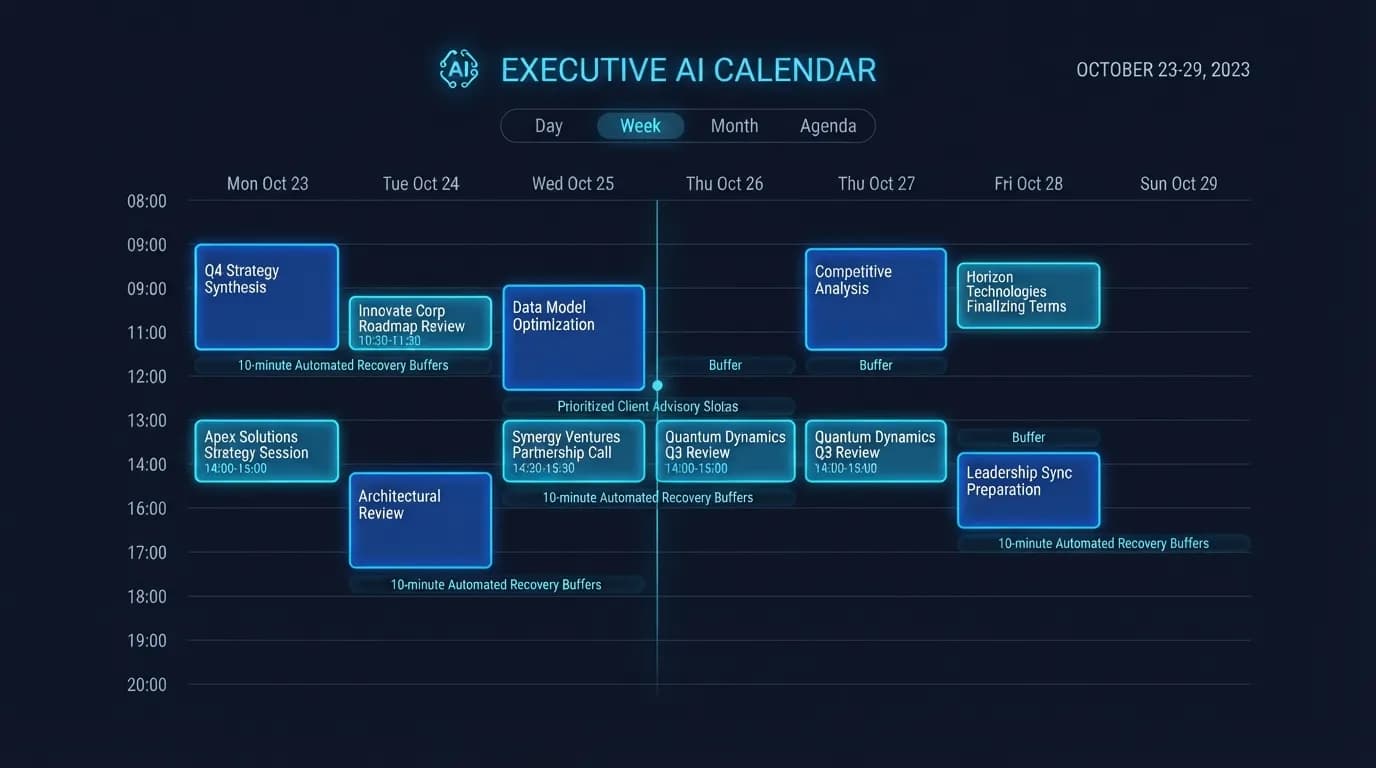
- Automated Meeting Buffers: Enforces mandatory 10-minute or 15-minute decompression breaks before and after external client calls.
- Generous Free Tier: The Lite plan is free forever for solo consultants, syncing up to two calendars and supporting up to three recurring habits (Temporal).
Key Limitations:
- Not a full project management suite: lacks Gantt charts or complex dependency boards.
- Native mobile app support is limited compared to desktop/web workflows (Volticen).
Pricing: Free Lite tier; Starter at $8 to $10 per user monthly and Business at $12 to $18 per user monthly (billed annually).
2. Motion: Best for Deadline-Heavy Consultants Running Multiple Retainers
If you are juggling five active client engagements with hard deliverable deadlines, manual daily planning breaks down fast. Motion takes a stricter autopilot approach: you enter tasks with durations and deadlines, and Motion's algorithm schedules every work block onto your calendar in real time.
Core Strengths:
- Autonomous Rescheduling: When a client strategy call runs 20 minutes over or an urgent request drops in, Motion recalculates your entire week automatically and alerts you if a deadline is at risk.
- Unified Project & Calendar Workspace: Combines task dependencies, project stages, native mobile apps, and booking links in a single workspace (Orchestra).
- Strict Focus Protection: Treats scheduled deep work as non-negotiable unless a higher-priority deadline overrides it.
Key Limitations:
- No Permanent Free Tier: Offers a 7-day trial only, with paid plans starting at $19 per seat monthly for teams or $29 monthly for individuals billed annually ($49 month-to-month).
- High Surrender of Control: Some advisors find it jarring when the AI shuffles their afternoon tasks unexpectedly.
Best For: Fractional executives, technical consultants, and solo advisors managing tight, competing client deadlines who want to stop manually planning their days.
3. Clockwise: Best for Multi-Partner Consulting Teams
While Reclaim and Motion shine for individual workload management, Clockwise is engineered to optimize collective calendars across an entire consulting team (Morgen).
Core Strengths:
- Team-Wide Calendar Defragmentation: Identifies flexible internal syncs across partners and associates, moving them into contiguous blocks to open multi-hour uninterrupted Focus Time windows for everyone.
- Slack and Asana Integration: Automatically updates Slack statuses during Focus Time and blocks internal interruptions.
- Low Team Cost: Functional free tier, with paid team plans starting at $5.50 to $6.75 per user monthly.
Key Limitations: Built primarily for internal team coordination on Google Workspace rather than solo client-facing pipelines.
4. Morgen and Trevor AI: Best Lightweight Multi-Calendar Planners
Not every consultant wants a heavy AI engine rearranging their week:
- Morgen: Excels at consolidating personal, firm, and external client calendars (Google, Outlook, iCloud, Fastmail) into one unified planner with AI-assisted time blocking and booking links (Chronock).
- Trevor AI: A clean, minimalist drag-and-drop time blocker that syncs Todoist, Google Tasks, and Microsoft To-Do onto your calendar with gentle AI slot suggestions (EasyClaw).
5. Conversational Booking Agents: Cal AI and Carly AI
A newer category focuses on eliminating the scheduling back-and-forth before a meeting ever hits your grid. Tools like Cal AI (voice scheduling agents inside Cal.com) and Carly AI (an AI executive assistant operating inside email threads) interpret natural language requests, propose times, and confirm holds automatically. Conversational scheduling interfaces achieve qualification and booking conversion rates up to three times higher than static forms.
Comparison Matrix: 2026 AI Scheduling Assistants
| Tool | Primary Mechanism | Control Model | Free Tier | Paid Starting Price (Annual) | Ideal Consultant Fit |
|---|---|---|---|---|---|
| Reclaim.ai | Rule-based Focus Time & Buffers | You keep control | Yes (Lite) | $8 to $10 per user/mo | Solo advisors defending deep work on Google/Outlook |
| Motion | Autonomous task-to-calendar autopilot | AI runs your day | No (7-day trial) | $29/mo Solo; $19/seat Team | Deadline-driven consultants with 5+ active deliverables |
| Clockwise | Team calendar defragmentation | Collective rules | Yes | $5.50 to $6.75 per user/mo | Multi-partner firms syncing internal Focus Time |
| Morgen | Multi-calendar consolidation & AI blocks | Hybrid manual/AI | Yes | $15/mo Pro | Fractional execs juggling multiple client accounts |
| Trevor AI | Drag-and-drop task time blocking | Human-led | Yes | $5/mo Pro | Minimalist solopreneurs wanting simple daily structure |
| Cal AI / Carly | Voice & email conversational booking | Automated edge | Varies | Usage / $35/mo | Consultants eliminating email scheduling ping-pong |
How AI Calendars Protect Billable Deep Work
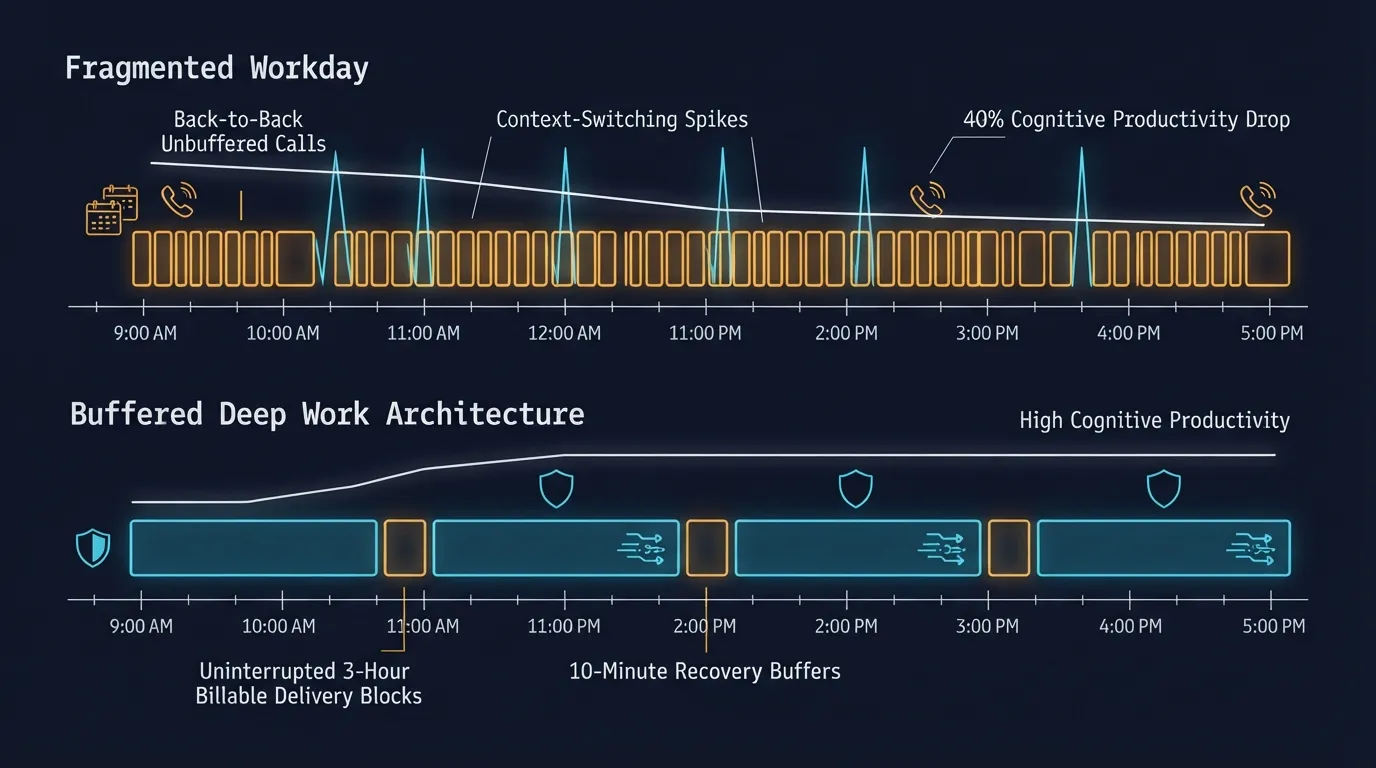
Recovery Fact: Adding mandatory 10-minute buffers between consecutive virtual meetings reduces neurological stress accumulation by roughly 50 percent (Microsoft Human Factors Lab).
When configured properly, an AI calendar defense layer transforms a consultant's week in three ways:
- Eliminates Fragmented 30-Minute Gaps: Instead of leaving awkward half-hour slivers between calls where no real strategic work happens, tools like Reclaim and Clockwise cluster meetings into dedicated windows.
- Enforces Recovery Buffers: Automatic 10-minute buffers prevent back-to-back call fatigue and give you time to review post-call AI summaries before the next client joins.
- Protects Non-Billable Growth Habits: Weekly business development, writing, and pipeline follow-ups get defended automatically instead of getting pushed to evenings and weekends.
The Structural Limit: AI Defense Optimizes Around Calls, Gateways Filter Who Gets In
Here is the catch most productivity guides miss: AI calendar defense is reactive.
Reclaim.ai and Motion are brilliant at shuffling your tasks around meetings that are already on your calendar. They cannot evaluate whether a prospect booking a 45-minute slot has the budget, authority, or urgency to work with you.
If your front door is an ungated booking link, an AI calendar assistant simply helps you organize your week more neatly around unpaid discovery calls. As we documented in The Discovery Call Trap, unvetted calls quietly cost high-ticket practitioners six figures a year in lost billable capacity.
"AI calendar tools defend your hours once a meeting is booked, but an intake gateway defends who is allowed to book you in the first place. Whether you want higher booking volume or strict qualification filters so you spend your best hours with pre-warmed, paying clients, your front door must screen scope and budget before touching your calendar."
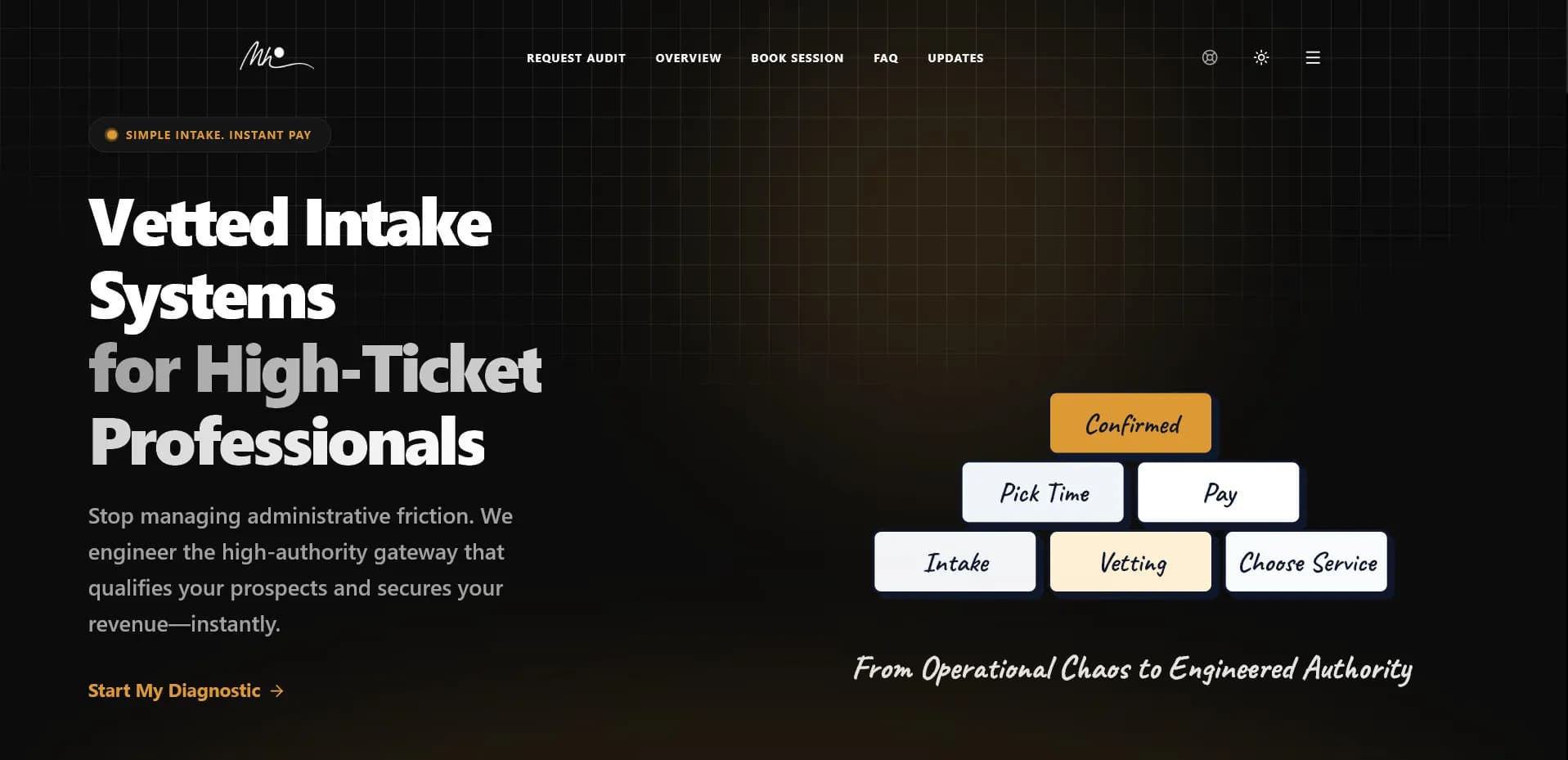
Stop organizing your week around cold inquiries. See how Simple Intake pairs conditional qualification and upfront Stripe deposits with your scheduling and AI calendar stack.
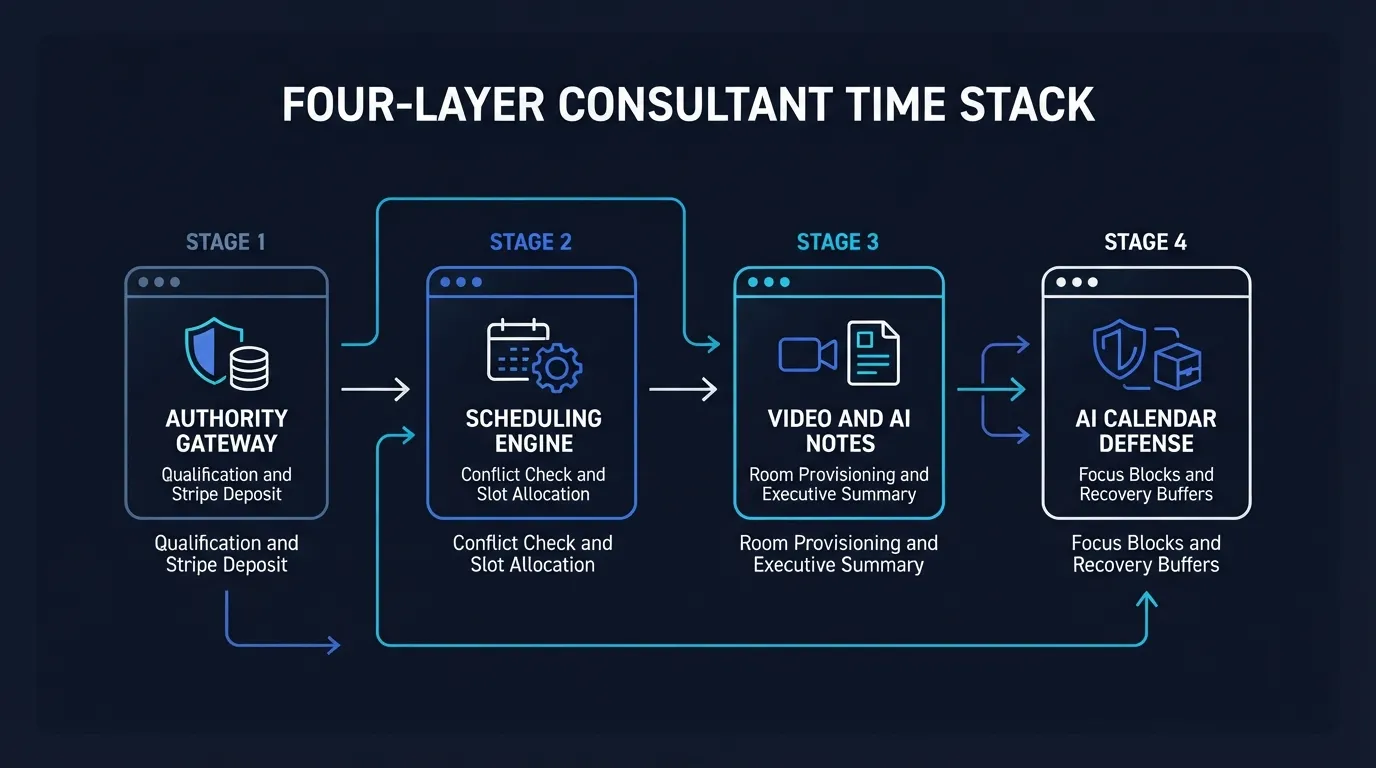
When you combine all four layers of the modern consultant time stack, every hour is accounted for:
- Website & GEO Layer: Captures high-intent buyers through fast, GEO-ready consultant pages.
- Authority Gateway Layer (Simple Intake): Qualifies scope, scores budget readiness, and collects upfront diagnostic fees before opening availability.
- Scheduling & Meeting Layer: Routes confirmed bookings through your consultant scheduling software into private rooms and AI notetakers in your consultant meeting stack.
- AI Calendar Defense Layer: Protects uninterrupted delivery blocks and 10-minute recovery buffers around those vetted calls.
Summary: Which AI Scheduling Assistant Should You Pick?
- If you want free, reliable focus protection on Google Calendar: Start with Reclaim.ai Lite.
- If you juggle heavy deliverable deadlines across multiple retainers: Commit to Motion.
- If you run a multi-partner consulting firm: Deploy Clockwise to align team Focus Time.
- If you manage three or more client email accounts: Consolidate your grid inside Morgen.
Pair your chosen AI calendar assistant with an upfront intake gateway so you only spend protected meeting windows with clients ready to invest.