The Best Meeting Software for Consultants: 2026 Guide
Finding the best meeting software for consultants is not just about video quality or screen sharing. It is about how your virtual meeting room protects your billable time, elevates your authority, and turns live conversations into high-retention client deliverables.
If your calendar coordinates when you meet, your meeting software is your virtual office: it is where you diagnose client problems, deliver high-stakes advisory, and earn your revenue. Yet most consultants make a fundamental mistake: they treat their video call platform as an isolated utility. They generate a naked meeting link, email it to an unvetted prospect, and spend the first 30 minutes delivering free strategy to someone who was never going to buy.
Advisory Fact: 68 percent of independent consultants report losing between 2 to 5 billable hours each week to unbilled discovery conversations, technical friction, and out-of-scope advisory questions.
When your time is the product, your meeting infrastructure needs to solve three distinct operational demands:
- Frictionless Client Access: If your clients are busy C-suite executives, forcing them to download proprietary software or troubleshoot audio drivers erodes trust before the conversation even starts.
- Deliverable Transformation: A consultation should never end as ephemeral audio. High-performing advisors turn client conversations into structured executive summaries, action roadmaps, and searchable recordings without manual note-taking overhead.
- Edge Protection: Meeting software coordinates the live session, but it does nothing to prevent unqualified prospects from entering. You need clear boundaries that gate access, collect upfront deposits, and ensure every minute on camera is compensated.
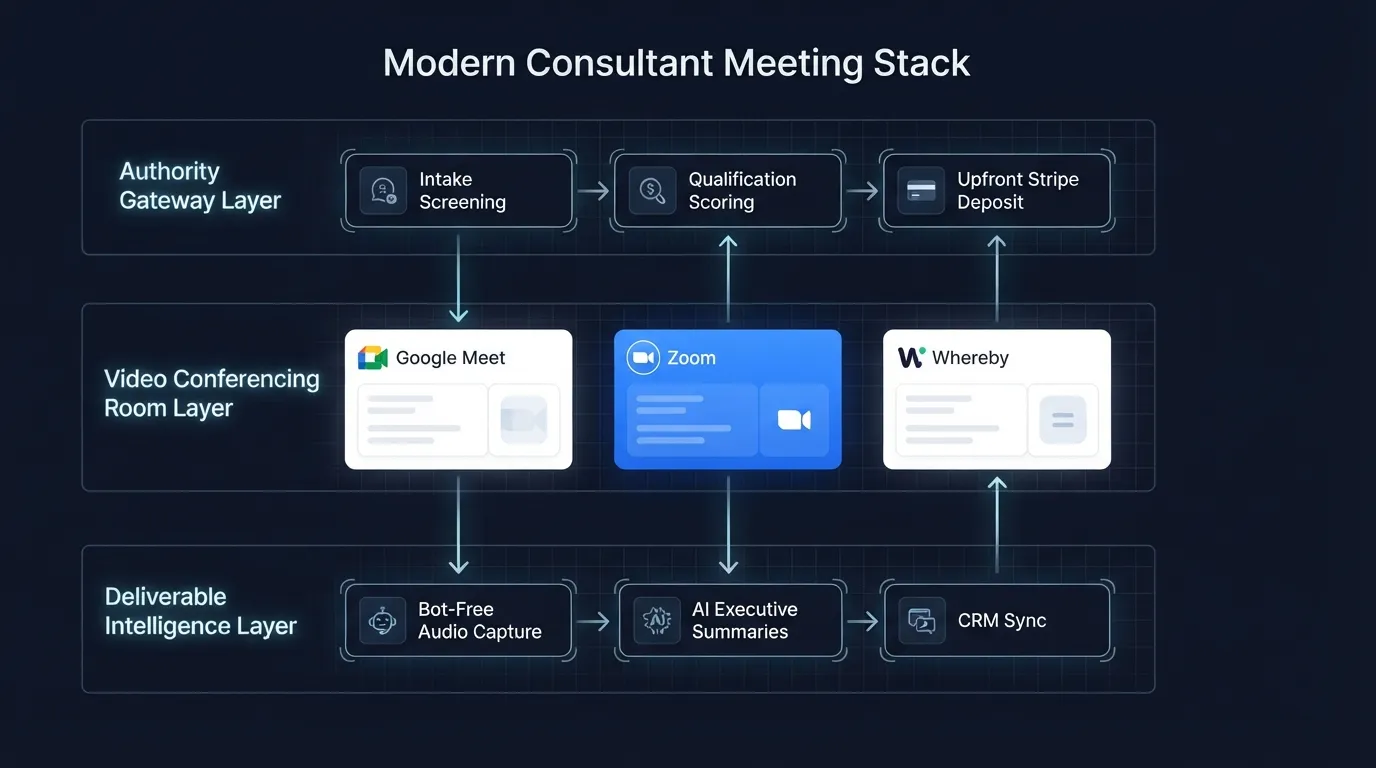
Here is an objective, practical breakdown of the meeting software landscape for consultants in 2026, comparing the room layer, the intelligence layer, and how to bridge the gap between open conversations and profitable advisory.
Layer 1: The Core Video Room Engines
The foundation of your meeting stack is the video room itself. The primary objective is bulletproof reliability and minimal friction for the client.
1. Google Meet: The Frictionless Cloud Baseline
For consultants operating on Google Workspace, Google Meet is the simplest, most accessible video platform available.
Core Strengths:
- Zero Client Downloads: Prospective clients click a single browser link and join immediately. No desktop client, browser plugins, or account logins are required.
- Native Workspace Synchronization: Built directly into Google Calendar and Gmail, automatically attaching unique, secure video links to every scheduled session.
- Included in Workspace Licensing: Solo practitioners and boutique firms already paying for Google Workspace ($6 to $18 per user monthly) face zero additional software expense.
- Clean Interface: Minimalist layout that keeps the focus on discussion and screen sharing rather than complex menu hierarchies.
Key Limitations:
- Lacks native breakout rooms or complex polling on lower Workspace starter plans.
- Basic in-call recording controls; advanced automatic transcription requires higher-tier Enterprise licenses or third-party add-ons.
- Limited custom visual branding for the meeting room background or waiting lobby.
Best For: Independent consultants, fractional leaders, and solo advisors conducting frequent one-on-one strategy sessions where frictionless client access is the top priority.
2. Zoom: The Enterprise Benchmark
Zoom remains the universal standard for business video communication, offering the broadest feature depth across remote work.
Core Strengths:
- Universal Market Familiarity: Virtually every enterprise client, corporate team, and executive already has Zoom installed and understands how to use it.
- Advanced Multi-Party Controls: Exceptional breakout room management, multi-screen sharing, and granular host permissions for multi-stakeholder workshops and team coaching.
- Reliable Cloud Recording: Local and cloud recording with automated audio separation, making it easy to archive client sessions for compliance or training.
- Ecosystem Integrations: Deep marketplace connectivity with CRM platforms, calendar engines, and automated AI meeting assistants.
Key Limitations:
- 40-minute hard cap on free group calls (three or more participants); Pro plans start at $13.33 to $16 per host monthly (billed annually).
- Client friction: While a web client exists, Zoom constantly nudges users to download its native desktop application, which can cause delays for corporate clients on locked-down company laptops.
- Security configurations like waiting rooms and passcodes can occasionally confuse external clients if not pre-configured properly.
Best For: Consulting firms running multi-stakeholder corporate workshops, interactive group coaching cohorts, and consultants who frequently present to large enterprise client boards.
Client Experience Fact: Over 84 percent of executive clients prefer browser-based meeting links over native desktop software downloads when engaging external advisors for initial consultations.
3. Whereby: The High-Touch Boutique Experience
Whereby has carved out a dedicated following among boutique strategy advisors and coaches who prioritize premium client presentation.
Core Strengths:
- Permanent Custom URLs: Instead of generating random strings of meeting digits, Whereby lets you claim a permanent, branded room link (such as
whereby.com/your-firm/strategy-room). - Complete Browser Freedom: Runs entirely inside WebRTC in modern browsers. Clients never download software or register an account.
- Boutique Visual Aesthetics: Customizable room branding, custom room wallpapers, and polished typography that create an intimate, high-end advisory ambiance.
- Lightweight Operation: Uses minimal system memory compared to heavy desktop clients, preventing laptop fan noise during intensive screen-sharing presentations.
Key Limitations:
- Free plan is limited to one room with up to four participants. Pro plans cost $8.99 to $14.99 per month.
- Lacks deep enterprise administration features or large-scale webinar management.
- Advanced participant analytics and enterprise user governance are minimal compared to Zoom.
Best For: Boutique strategy advisors, executive counselors, and high-touch practitioners who want their video meetings to feel like a private, polished executive suite.
4. Microsoft Teams: The Corporate Enterprise Default
If your consulting practice serves Fortune 500 corporations, government departments, or healthcare institutions, Microsoft Teams is an unavoidable reality.
Core Strengths:
- Corporate IT Dominance: Enterprise security teams routinely whitelist Teams while restricting third-party software like Zoom.
- Enterprise Compliance: Native support for end-to-end encryption, strict compliance recording, and institutional governance.
- Included in M365: Free for firms already using Microsoft 365 Business suites.
Key Limitations:
- Extremely resource-heavy desktop application with frequent cache and audio device glitches.
- Joining external client calls as a guest can be a notoriously clunky experience involving Microsoft account switching.
Best For: Management consultants and implementation partners embedded inside corporate client environments for months at a time.
Layer 2: Meeting Intelligence and AI Capture
A paid consulting meeting should never end as a forgotten conversation. Meeting intelligence software captures discussion nuances, transcribes scope details, and produces executive deliverables without manual note-taking.
Deliverable Fact: Consulting clients report a 32 percent higher perception of value when structured session summaries, identified risks, and agreed action roadmaps are delivered within 60 minutes of call completion.
1. Granola: The Bot-Free Mac Powerhouse
Most AI notetakers deploy a visible, clunky bot participant (such as "John Doe's Notetaker") into the meeting, which can make corporate clients uncomfortable and violates confidentiality norms in sensitive discussions.
How Granola Works: Granola runs locally on macOS, capturing the system audio of the call directly from your computer without injecting a bot into the participant list.
Why Consultants Love It:
- Zero Visible Intrusion: The client sees only you. No strange bot joins the call, making it safe for confidential C-suite advisory, M&A discussions, and private legal or financial reviews.
- Human-Guided Notes: Rather than dumping a 10-page stream-of-consciousness transcript, Granola pairs your own brief bullet points with the call transcript to generate crisp, beautifully formatted executive briefs.
- Fast Post-Call Handoff: Formats notes into professional client follow-up emails, decision registers, and project roadmaps in seconds.
Pricing & Limits: Free tier includes 25 meetings; Pro plan is $10 to $14 monthly. macOS only.
2. Fathom: The Generous Virtual Notetaker
Fathom has become one of the most popular AI meeting tools for consultants due to its speed, accuracy, and free offering.
How Fathom Works: A dedicated notetaker joins your Zoom, Google Meet, or Microsoft Teams sessions, records the conversation, generates real-time transcripts, and creates AI summaries immediately after the call ends.
Why Consultants Love It:
- Instant Summary Delivery: Notes and timestamped highlights are available within 30 seconds of hanging up.
- Granular CRM Synchronization: Automatically logs call recordings, action items, and summaries directly to HubSpot, Salesforce, or Close.
- Generous Free Plan: Unlimited recording, transcription, and basic AI summaries with no artificial meeting cap. The Team Edition ($19 to $29 per user monthly) adds advanced CRM routing and deal intelligence.
Best For: Independent consultants and sales-focused advisory practices that run high-volume discovery calls and need automated CRM logging.
3. Fireflies.ai: The Knowledge Base and Multi-Platform Vault
Fireflies is engineered for multi-partner consultancies that need a searchable, centralized repository of all historical client conversations.
Why Consultants Love It:
- Universal Platform Coverage: Supports Google Meet, Zoom, Teams, Webex, and direct audio file uploads.
- AskFred AI Assistant: Allows you to query your entire consulting library using natural language (for example, asking "What budget did Acme Corp mention during our kickoff call in October?").
- Soundbites and Snippets: Easily clip 30-second audio snippets to share key client feedback with your delivery team.
Pricing: Free tier available; Pro plan at $10 per user monthly (billed annually), and Business plan at $19 per user monthly.
Video and Intelligence Tool Comparison Matrix
| Platform / Tool | Tool Category | Monthly Cost (Annual) | Client Download Required | Client Privacy Profile | Standout Feature | Ideal Advisory Model |
|---|---|---|---|---|---|---|
| Google Meet | Video Room | Included in Workspace ($6+) | No (Browser Native) | Standard Cloud | Zero friction, calendar native | Solo consultants, quick client check-ins |
| Zoom | Video Room | Free (40 min) or $13.33/mo | Desktop app urged | Standard Cloud | Breakout rooms, universal familiarity | Multi-stakeholder workshops, enterprise boards |
| Whereby | Video Room | Free (1 room) or $8.99/mo | No (Browser Native) | High Boutique Polish | Permanent custom room URLs | High-touch boutique strategy, executive advisory |
| Teams | Video Room | Included in M365 ($6+) | Desktop app preferred | Enterprise Corporate | IT whitelisting, enterprise compliance | Embedded corporate management consultants |
| Granola | AI Intelligence | Free or $10 to $14/mo | Local macOS app | Total (No bot participant) | Human-led notes without bot intrusion | Confidential C-suite advisory, private strategy |
| Fathom | AI Intelligence | Free or $19 to $29/mo | Bot joins call | Visible bot on call | Generous free tier, instant CRM logging | Pipeline-driven consultancies, discovery calls |
| Fireflies | AI Intelligence | Free or $10 to $19/mo | Bot joins call | Visible bot on call | Searchable repository, multi-call recall | Multi-partner agencies, research teams |
Layer 3: Monetized Call Platforms vs. Custom Gated Infrastructure
When consultants decide to monetize their time directly, they often look at dedicated paid call platforms like Intro, Clarity.fm, or Superpeer.
The Marketplace Trap: Convenient but Expensive
Paid call platforms allow experts to list an hourly rate, share a booking link, and collect payment automatically before the call occurs.
Where they succeed:
- Handles billing and calendar coordination out of the box.
- Provides immediate credibility for individual experts starting from scratch.
Where they fail:
- High Platform Taxes: Platforms typically deduct 15 to 30 percent of every transaction. On a $1,000 strategy diagnostic, you sacrifice $150 to $300 per call for basic video forwarding.
- No Client Relationship Ownership: You cannot customize the branding, build proprietary intake workflows, or seamlessly redirect the client into a high-ticket retainer.
- Marketplace Commodity Positioning: Your profile sits directly beside competing advisors, encouraging clients to price-shop rather than view you as a category authority.
Revenue Leakage Fact: Across professional services firms, unbilled advisory provided inside informal discovery calls accounts for 4 to 10 percent of total EBITDA walking out the door in uncompensated strategy.
The Operational Blind Spot: Meeting Tools Own the Middle, Gateways Own the Edges
Choosing reliable video software and sharp AI transcription solves the mechanics of running a great session. But here is the critical operational insight most practitioners overlook:
Meeting tools own the middle 45 minutes. They do not own the edges.
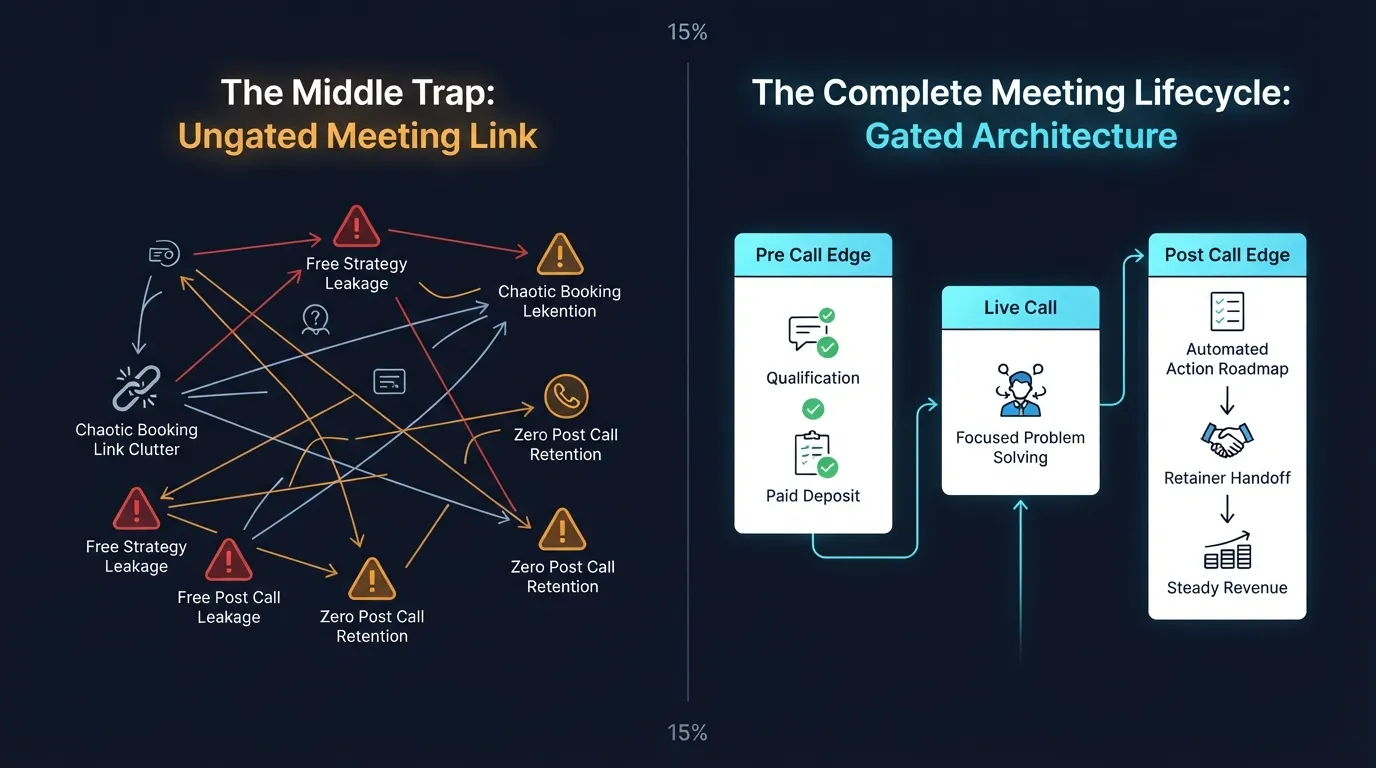
What happens during the call is rarely where consulting businesses bleed revenue. Revenue is lost at the edges:
- The Pre-Call Edge (The Gating Void): You share a calendar link integrated with Zoom or Google Meet. An unqualified prospect books 45 minutes of your time. Because there was no financial friction or rigorous intake form, they treat the call as free consulting. You spend 45 minutes answering technical questions, only for them to disappear.
- The Post-Call Edge (The Retainer Gap): The call ends, but there is no structured diagnostic deliverable or automated mechanism to transition the prospect from a single paid consultation into a $10,000 retainer or ongoing advisory scope.
Relying solely on video software forces you to protect your boundaries manually inside the conversation itself, turning advisory into awkward sales negotiation.
"Video conferencing tools manage the audio and video inside the call, but an intake gateway manages who is allowed in the room. If you sell your expertise by the hour, an ungated meeting link is the fastest way to leak billable value. Gating your calendar ensures every minute you spend on camera is with serious, pre-committed clients who have already qualified and paid."
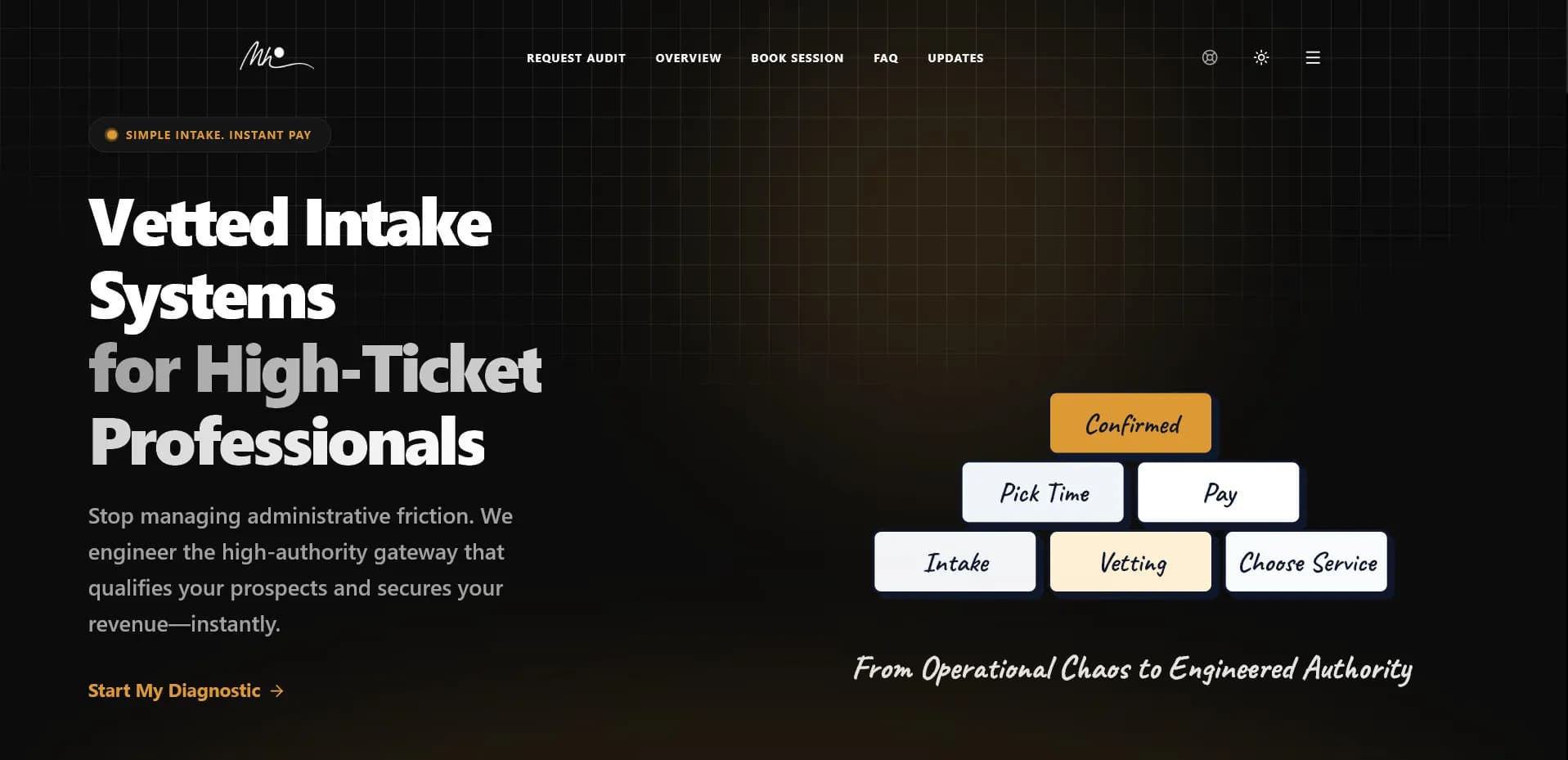
Stop trading unbilled hours for unvetted calls. Discover how Simple Intake engineers custom authority gateways that pre-qualify prospects, collect diagnostic deposits, and protect your advisory time.
How Simple Intake Bridges the Meeting Stack
You do not need to abandon your preferred video platform. Whether you run client sessions on Google Meet, Whereby, or Zoom, your video software handles the audio-visual layer with excellence.
What protects your practice is an Authority Gateway positioned in front of your meeting tools:
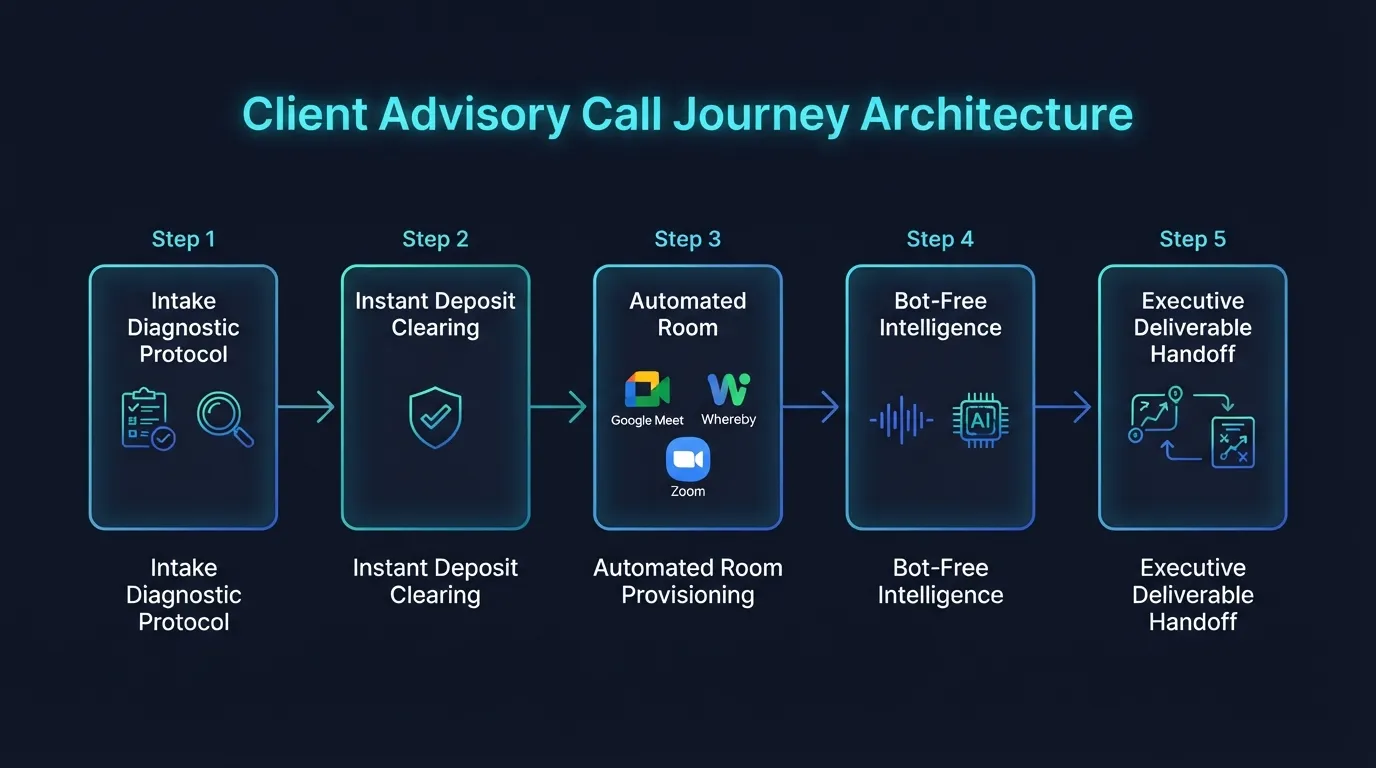
- Before the Call: The prospect visits your gateway. Before any meeting room link is generated, they complete a structured diagnostic questionnaire outlining project scope, budget capacity, and key obstacles.
- Instant Upfront Monetization: If the session is a paid strategy diagnostic, the gateway collects the session fee or retainer deposit directly through Stripe before the video link is provisioned.
- Automated Meeting Provisioning: Once qualified and paid, Simple Intake automatically coordinates with your scheduling engine and provisions a private, secure Google Meet, Whereby, or Zoom room.
- Zero Tire-Kickers: Unqualified leads receive a polite automated redirection to self-serve resources, ensuring your on-camera energy is reserved exclusively for clients who respect your expertise.
Summary: Designing Your 2026 Consultant Meeting Stack
To build a professional, profitable meeting architecture, pair your tools according to your consulting model:
- For the Solo Strategy Advisor: Pair Whereby (for high-touch, no-download client polish) with Granola (for discreet, bot-free executive notes).
- For the Google-Centric Fractional Executive: Pair Google Meet (for zero-friction calendar sync) with Fathom (for rapid post-call action items).
- For the Enterprise Workshop Leader: Use Zoom (for multi-breakout controls and universal client compatibility) paired with Fireflies.ai (for cross-client repository recall).
- For Corporate Management Consultants: Stick to Microsoft Teams (to satisfy institutional IT and security protocols).
Once your meeting room and AI transcription are configured, place an authority gateway at the front door. Own your virtual room, automate your deliverables, and gate your time.